If you’ve ever stood behind a mixing console at a show, or poked around a studio rack out of curiosity, you’ve probably run into the term quad equalizer at some point. It’s not the flashiest piece of gear in the room – nobody’s taking photos with it – but it quietly does a ton of work shaping how everything actually sounds. Let’s break down what it is, why it matters, and what to actually look for if you’re thinking about getting one.
Quad Equalizer Explained: What Is It?
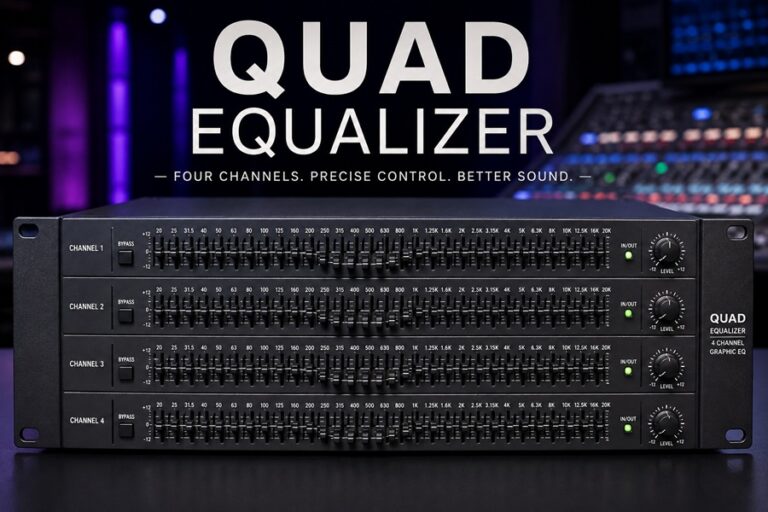
A quad equalizer is basically a four-channel graphic EQ crammed into one rack unit. Instead of running four separate single-channel EQs – which eats up rack space fast – you get four independent channels of frequency control in one box. Each channel usually has its own bands, its own controls, often its own bypass switch too. Nothing exotic about the concept once you see it laid out, but it solves a problem that’s genuinely annoying if you’ve ever tried cramming a full rig into a tour case with limited space.
“Quad” just means four. That’s it, nothing fancier going on with the name. The appeal is pretty obvious once you think about it: any time you need consistent, precise EQ across multiple sources at once – think monitor mixes, subgroups, different zones in a venue – a quad equalizer lets you handle all of it from one spot instead of hunting across four different boxes.
Why Use a Quad Equalizer?
Graphic EQs are already a staple in live sound and studio work. The quad format specifically solves something very practical: space and workflow.
Quad Equalizer for Managing Four Channels
One quad equalizer handles four separate feeds – front-of-house, a few monitor wedges, whatever you need. Compare that to dedicating four rack spaces to four single-channel units. The space savings alone is why touring rigs lean toward this format so heavily.
Quad Equalizer for Consistent Venue Sound
Bigger venues with multiple zones – think churches with a sanctuary plus an overflow room plus a lobby – need slightly different EQ treatment in each space. A quad equalizer lets one engineer dial in all of that from a single unit instead of running around adjusting separate gear in separate rooms.
Fighting Feedback on Stage
Monitor engineers reach for a quad equalizer constantly, mainly for cutting the specific frequencies that trigger feedback. Since one unit can cover four monitor sends at once, it becomes the fastest way to manage a whole stage’s worth of feedback-prone frequencies without bouncing between different pieces of gear.
What Actually Matters When Choosing One
Not every quad equalizer on the market is built the same, and honestly, the differences matter more than people expect going in.
How Many Bands Per Channel
Most units land somewhere between 15 and 31 bands per channel. More bands means finer control – useful when you’re chasing down a specific feedback frequency or doing detailed tonal work. A 31-band setup gets you roughly one band per third-octave, which is basically the professional standard at this point.
Adaptive-Q or Constant-Q
Older-style constant-Q filtering can introduce ripple and weird gain-boosting when you start adjusting bands that sit next to each other. Better quad equalizer designs use adaptive-Q filtering instead, where the response shifts based on how you’ve set things, giving you a cleaner result that actually matches what the display’s showing you. Less guesswork, basically.
Built-In Measurement Gear
Nicer units come with a measurement mic, an SPL meter, and an RTA built right in. That combo lets you actually measure a room’s response and line it up against your EQ settings, instead of eyeballing everything by ear and hoping for the best. Saves a lot of time, especially in unfamiliar rooms.
Bypass Switches
Small feature, genuinely useful. Flip the bypass and you instantly hear the difference between processed and untouched signal. Good way to check you’re actually improving things and not just… changing them for the sake of it.
Digital Internals, Analog Connections
A lot of modern quad equalizer units run digital processing under the hood while still offering analog ins and outs. Best of both worlds, really – precise, repeatable settings with preset recall, but it still slots right into a traditional analog signal chain without any fuss.
Quad Equalizer vs Four Single-Channel EQs
Worth laying this out directly, since it’s the comparison most people are actually trying to make.
| Factor | Quad Equalizer | Four Single-Channel EQs |
| Rack space | One unit | Four separate units |
| Overall cost | Usually cheaper | Adds up fast |
| Flexibility | Locked to four channels | Mix and match brands freely |
| Workflow | Everything in one spot | Controls scattered around |
| Risk if it fails | Lose all four at once | Failure stays isolated |
The real trade-off is convenience versus redundancy. If a quad equalizer dies mid-show, you’re potentially losing control over four channels in one go. Single units isolate that risk. Still, for most touring and installed setups, the space and workflow savings win out – that’s just the practical reality most engineers land on.
Where to Use a Quad Equalizer
Live Sound
Touring engineers lean on a quad equalizer to manage front-of-house alongside several monitor sends at once, keeping the whole stage’s tonal balance under one roof, so to speak.
Churches and Installed Venues
Multi-room venues – churches especially – use a quad equalizer to handle separate acoustic spaces that each need their own EQ treatment, without needing separate hardware for each room.
Studios
Less common for actual track mixing, where parametric EQ tends to win out, but a quad equalizer still earns its keep for monitor calibration, managing headphone mixes for multiple performers, or handling outboard chains where several channels need matched processing.
Broadcast and Multi-Zone Spaces
Facilities pushing audio out to multiple rooms – broadcast studios, big commercial spaces – often use a quad equalizer to fine-tune each output independently while keeping the physical footprint small.
Setting One Up the Right Way
Plugging it in and randomly pulling faders until something sounds better isn’t really a strategy. A bit more method goes a long way.
- Start flat. Zero everything out first so you’ve got a clean baseline to work from.
- Use the RTA if you’ve got one. Don’t guess by ear when the unit can actually measure the room for you.
- Cut before you boost. Pulling down problem frequencies almost always sounds cleaner than pushing up the ones you like.
- Handle feedback first on monitors. Notch out the ringing frequencies before touching anything tonal.
- Check the bypass constantly. Flip it back and forth to confirm you’re actually improving things.
- Save your settings. If the quad equalizer supports presets, use them – future-you will be grateful at the next show.
Picking the Right One for Your Setup
A few honest questions to ask before buying.
How many bands do you actually need?
Fifteen bands covers basic shaping fine. If you’re chasing feedback in tricky rooms regularly, go for a 31-band quad equalizer instead.
Do you need the measurement tools?
If you’re constantly tuning new, unfamiliar spaces, a built-in RTA and mic pays for itself pretty quickly in saved setup time.
Does it match your signal chain?
Check the ins and outs line up with what you’re already running – balanced analog, digital, whatever your rig uses.
How much rack space do you actually have?
This is the whole point of a quad equalizer in the first place, so don’t skip checking it against your actual case dimensions.
What’s the budget?
Prices swing a lot, from fairly affordable options for smaller rooms up to serious professional-grade units with adaptive filtering and full measurement suites for touring work.
A Well-Known Name in This Space
One of the more recognized units in the quad equalizer category is the Mackie Quad EQ. It packs four channels of 30-band Adaptive-Q equalization, plus a bundled measurement mic, an SPL meter, and RTA functionality built right in. The adaptive filtering was specifically designed to avoid the ripple and gain-boosting issues that plagued older constant-Q units, which is a big part of why it’s stuck around as a go-to for both touring and installed sound work.
Other manufacturers make similar multi-channel units too, varying in band count, filter design, and what measurement tools come bundled in. Worth checking actual reviews from engineers who’ve used a given unit in situations like yours, not just the spec sheet.
Where This Format Actually Came From
Multi-channel graphic EQs weren’t always a four-channel standard, by the way. Early graphic EQ gear was almost always single-channel – one box, one signal path, whether that was a monitor send or a full mix. As live sound setups got more complicated through the 80s and 90s, with more monitors and more zones to manage, engineers started wanting a way to consolidate racks without giving up control.
That demand is basically what pushed manufacturers toward the quad equalizer format in the first place. Cramming four independent channels into one rack unit meant handling a lot more of a show’s audio without a wall of individual boxes. Digital processing made this even easier down the line, letting manufacturers pack sophisticated filtering and preset recall into a footprint that would’ve been impossible with pure analog circuitry a couple decades back.
Mistakes People Make With a Quad Equalizer
Even engineers who’ve been doing this a while trip over a few recurring issues.
Touching Every Single Band
Tempting, sure – grab every fader on the quad equalizer and start yanking things around. In practice, targeted cuts at specific problem frequencies almost always beat sweeping, everywhere-at-once adjustments. Too much fiddling across too many bands tends to introduce phase weirdness and a tone that just sounds off, without you being able to pinpoint why.
Forgetting the Channels Interact
Since a quad equalizer packs four channels into one box, it’s easy to forget adjustments on one channel don’t happen in a vacuum. A monitor channel dialed in completely alone, without listening against the full mix, can end up clashing with front-of-house in ways that don’t show up until the room’s actually full.
Skipping Gain Staging
A quad equalizer sits inside a bigger signal chain, and if your input levels aren’t sorted before the signal even reaches the unit, no amount of EQ tweaking fixes that underlying problem. Get gain staging right first – it saves a lot of headache later.
Not Saving Presets
Given how long it can take to properly tune a quad equalizer for a specific room, not saving that work is just a waste. Most digital units support preset recall exactly so you’re not starting from scratch every single time you’re back in a familiar space.
Quad Equalizer Setups in Portable Rigs
Worth touching on this separately, since it comes up a lot with smaller touring acts and mobile DJs. A quad equalizer works especially well in portable rigs where every pound and every rack space actually matters. Instead of hauling around a stack of single-channel EQs plus their cabling, one quad equalizer with proper labeling can cover front-of-house, two monitor sends, and a subwoofer feed, all from a box that fits in a single rack space.
The trade-off, again, is that single point of failure thing. For a small act doing weekly bar gigs, that risk is usually acceptable given how much simpler setup and teardown becomes. For a bigger touring production with a full backline of redundancy built into everything else, engineers sometimes prefer splitting things back out across multiple units, just so a single hardware failure doesn’t take out monitor control for the whole band mid-set. Nobody wants to be the engineer explaining to the headliner why their in-ears went silent halfway through the second song.
Either way, it’s a call worth making deliberately rather than by default. Know what you’re trading before you commit your rig to one format or the other.
Digital Recall and Why It Actually Matters
One thing that doesn’t get talked about enough with a quad equalizer is how much time preset recall actually saves once you’re doing repeat gigs in the same venues. Tuning a room properly the first time can eat up a solid chunk of your setup window, especially if you’re chasing feedback across four monitor channels by ear. Once that work’s done and saved, walking back into that same room next month means loading a preset instead of starting from zero.
This matters more than it sounds like on paper. Anyone who’s had to re-tune an entire stage from scratch because a preset didn’t save properly knows exactly how much of a headache it avoids. If you’re gigging regularly in a rotation of familiar rooms, this single feature alone can be worth prioritizing over having a couple extra bands per channel.
FAQs
What does “quad” actually mean here?
Four independent channels built into one equalizer unit, each with its own controls.
Is a quad equalizer better than four separate single-channel EQs?
Depends what you value more. A quad equalizer saves space and simplifies your workflow. Separate units give you more flexibility and don’t put all four channels at risk if one thing fails.
Can you use a quad equalizer in a studio?
Yeah, though it’s more common for monitor calibration or headphone mixes than actual track mixing, where parametric EQ tends to be preferred.
Adaptive-Q vs constant-Q, what’s the actual difference?
Constant-Q can ripple and boost gain unexpectedly when nearby bands get adjusted. Adaptive-Q shifts the filter response dynamically so it matches what you actually see on the display.
Do I need a measurement mic to use one properly?
Not strictly, no. But it speeds up tuning a lot, especially in a room you don’t already know well.
Wrapping It Up
A quad equalizer earns its spot in the rack by solving a real, practical problem – precise, independent control over four channels without eating up half your rig or complicating your signal chain. Whether you’re wrangling monitor mixes on a busy stage, tuning separate zones in an installed system, or handling outboard processing back in the studio, the right quad equalizer makes that job faster and a lot more consistent.
What it comes down to, really, is matching band count, measurement features, and signal chain compatibility to what you’re actually doing day to day. Get that right, and a quad equalizer stops being just another box taking up rack space – it becomes one of the more genuinely useful pieces of gear you own. Whether you end up going with a budget-friendly model for a small venue or a full-featured professional unit built for touring, the underlying logic stays the same: know your channels, know your rooms, and let the gear do the boring, repetitive work so you can actually focus on the mix.