
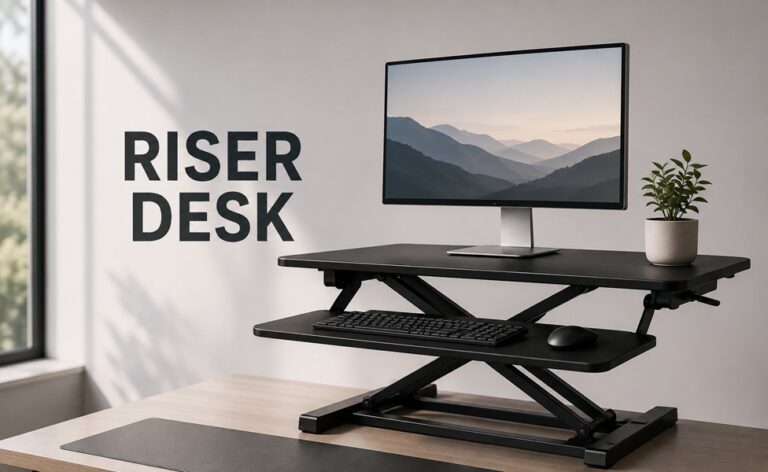
Somewhere between “I should really stop sitting all day” and actually buying a standing desk, most people run into this term and pause. What is a riser desk, exactly? It sounds like it should be self-explanatory, and honestly, it mostly is – but there’s enough nuance in how they work that it’s worth a proper explanation before you spend money on one.
Quick version: a riser desk sits on top of the desk you already have and lifts your monitor, keyboard, and mouse up to standing height. You push it up when you want to stand, push it back down when you’re ready to sit.
Let’s actually break down how these things work, what types exist, and whether one’s worth it for your setup.
What Is a Riser Desk, In Plain Terms
A riser desk – sometimes called a standing desk converter — is a platform, usually one or two tiers, that you place directly on your current desk. Lower it, and you’ve got a normal sitting setup. Raise it, and suddenly your monitor’s at eye level and you’re standing at the exact same spot.
What makes it appealing is how little commitment it takes. You’re not buying an entirely new desk or drilling anything into a wall. It just sits on whatever you’ve already got – wood, glass, laminate, doesn’t matter – and does its own thing independently.
Most riser desks move up and down using one of a few mechanisms: spring-assisted lifts, gas springs, hand cranks, or electric motors. Some are barely bigger than a laptop tray. Others come with a full second shelf so your keyboard and monitor sit at separate, properly ergonomic heights.
How the Mechanism Actually Works
The specific mechanics vary by model, but the basic idea stays consistent.
- Spring-assisted risers use a counterbalance spring, usually triggered with a side lever, that makes lifting feel smoother than it has any right to.
- Gas-spring versions work similarly but tend to feel a bit more refined and can often handle heavier dual-monitor setups.
- Crank-operated models need you to physically turn a hand crank – slower, sure, but there’s basically nothing to break.
- Electric risers run off a motor and move with a button press – fastest option, least physical effort involved.
Whichever version you end up with, the point is the same: get your setup to standing height in a few seconds, then back down just as fast.
Why This Became So Popular
Beyond the basic definition, it’s worth understanding why so many people ended up buying one of these instead of a full standing desk.
- Cost. A riser desk is usually a fraction of what a motorized standing desk frame runs.
- Zero installation. Set it down, plug it in if it’s electric, done.
- Portability. Switching desks or offices? Just take it with you.
- Less sedentary time. Alternating between sitting and standing throughout the day genuinely helps with back strain over long stretches.
- Works in rentals. If you can’t swap out furniture permanently, this is one of the few upgrades that doesn’t require touching anything.
For a lot of people, it’s really the easiest way to test whether standing work even suits them before committing to a bigger purchase.
The Main Types Worth Knowing
Not every riser desk is built the same, and the type you pick matters more than people expect going in.
Single-tier risers put your monitor and keyboard on the same flat surface. Compact, budget-friendly, though typing at monitor height isn’t always the most comfortable long-term.
Dual-tier risers separate the monitor shelf from the keyboard tray so each sits at its own proper height – generally the better pick if you’re using it daily, since it keeps your wrists and neck in a more natural position.
Compact laptop risers are smaller, lighter, and meant just for a laptop. Great for tight desks, though they don’t handle external monitors well on their own.
Full-width electric risers span the whole desk and usually support dual monitors plus a full keyboard-and-mouse setup, sometimes with extras like a phone holder tossed in.
Which one makes sense really comes down to desk space and how serious your daily setup needs to be.
What to Check Before You Buy
Once you’ve settled on the idea, a few things are worth double-checking before you actually order one.
- Weight capacity – ultra-wide monitors or dual setups need more than a basic riser can handle.
- Height range – check that the max standing height actually suits you; this gets skipped constantly.
- Desk depth – some risers need more room than others, so measure first.
- Stability at full height – a wobbly platform isn’t just annoying, it’s a real ergonomic problem.
- Keyboard tray depth – a cramped tray gets old fast if you type a lot.
- Noise, for electric models – motor volume varies a surprising amount between brands.
None of these are dealbreakers alone, but skipping the check is usually how people end up returning the thing a week later.
Riser Desk vs a Full Standing Desk
This comparison comes up constantly, so it’s worth tackling head-on.
A full standing desk replaces your desk entirely with a height-adjustable frame – usually electric, usually pricier, and it becomes the desk rather than sitting on top of one. A riser desk works with whatever you already own.
Riser desks tend to make more sense if you’re renting, working with a tighter budget, testing the standing-work idea before going all in, or need something you can move between spaces.
Full standing desks make more sense if you’ve got a permanent dedicated workspace, want more overall desk surface, or you’re building a long-term home office from the ground up.
Neither is objectively better. It’s really a question of space, budget, and how long-term the setup needs to be.
Setting One Up Properly
Getting a riser desk isn’t complicated, but a few small adjustments make a real difference in comfort.
- Set the standing height so your elbows land around a 90-degree angle while typing.
- Keep the top of your monitor roughly at eye level to avoid neck strain creeping in.
- Grab an anti-fatigue mat if you’ll be standing for longer stretches – bare hard floors get old fast.
- Alternate between sitting and standing rather than committing to standing all day, which brings its own strain over time.
- Check your cable slack, since raising and lowering the platform can tug on cords if there’s not enough give.
It’s a small setup process, but skipping it is exactly how people end up with sore wrists or a stiff neck within the first week.
Who Actually Needs One
Not everyone does, and it’s worth being honest about that. A riser desk tends to make the most sense for people sitting through long, uninterrupted stretches – remote workers, developers, writers, anyone glued to a screen for six-plus hours daily. If your job already has you moving around a lot, standing during the rest of your desk time matters less.
It’s also a solid fit for early signs of back stiffness or general discomfort from long sitting sessions, though if pain’s already significant, that’s a conversation for a doctor rather than something to just fix with a riser. And for shared offices or rentals where a permanent desk swap isn’t realistic, it’s often the only practical upgrade on the table.
On the flip side, if you already have a height-adjustable desk or your job involves frequent movement and breaks, a riser might just be an extra expense that doesn’t change much day to day.
Materials and Build Quality
What a riser desk is made from affects both how long it lasts and how stable it feels under regular use.
- Steel frames hold up best under repeated adjustments and heavier setups.
- MDF or particleboard surfaces keep costs down but wear faster over time.
- Aluminum parts show up in lighter, compact models without adding much weight.
- Non-slip surfaces on the platform stop your keyboard or mouse from sliding during height changes.
Cheaper isn’t automatically bad here, but it’s worth checking reviews specifically for long-term stability rather than first-impression build quality.
What They Typically Cost
Prices vary more than people expect, and it’s not always clear what the extra money buys.
Budget single-tier and laptop-only risers sit at the lower end and work fine for light, occasional use. Mid-range dual-tier options with separate shelves cost more but offer noticeably better ergonomics for daily use. Premium electric full-width models, especially ones built for dual monitors, sit at the top – the extra cost usually goes toward motor quality, weight capacity, and stability at full height.
Generally, spending a bit more on a dual-tier or electric model pays off if you’re using it every day rather than occasionally.
Small Desk, Small Riser
If you’re working with a compact desk, the more useful question of what is a riser desk that actually fits often matters more than which brand has the best reviews. Full-width electric models photograph well but can easily overwhelm a small desk, leaving no room for anything else.
For tighter setups, single-tier or compact laptop risers tend to work better – smaller footprint, easier to push back when not in use. Some models fold flat or detach quickly, which helps if the desk doubles as something else outside of work hours.
Measure your available space before falling for a specific model. Even a great riser desk turns frustrating fast if it just doesn’t fit where it needs to.
Mistakes Worth Avoiding
A handful of habits quietly undercut how useful a riser desk actually ends up being.
- Standing all day, every day. More isn’t automatically better – the point is alternating, not replacing sitting entirely.
- Ignoring monitor height. A riser fixes desk height, not a monitor that’s still sitting too low or too high.
- Buying on price alone. A cheap, wobbly riser with a low weight limit often ends up unused within a month.
- Skipping the measurements. Not checking desk depth or max height beforehand is one of the most common return reasons.
- Forgetting cable slack. Cords pulled tight during height changes can wear down ports over time.
Fixing even one or two of these tends to make a noticeable difference in whether the thing actually gets used long-term.
Keeping It in Good Shape
A riser desk is like anything with moving parts it lasts a lot longer if you take care of it. You should wipe down the tracks and joints on your riser desk every now. Then so dust does not get in the way of it moving smoothly. Do not put much weight on your riser desk even if it is just for a little while when you are moving things around. You should check the screws and the parts that hold your riser desk together every months especially if you are changing the height of your riser desk every day.
If you have an electric riser desk be careful not to pull the cord when you are moving the riser desk and keep the cables tidy so they are not stretched every time you change the height of your riser desk. None of this takes a time just a few minutes now and then but it makes a big difference. It is the difference, between a riser desk that still works after two years and a riser desk that starts to wobble after six months.
Riser Desks and Everyday Ergonomics
It’s easy to focus purely on the up-and-down mechanism and forget that a riser desk is, at the end of the day, part of a bigger ergonomic picture. A great riser paired with a poorly positioned chair, a screen that’s still too far away, or lighting that forces you to lean in doesn’t actually solve much on its own.
Think of it as one piece of a small system rather than a fix by itself. Chair height, monitor distance, wrist angle while typing, even where your feet land while standing – all of it works together. A riser desk handles the sitting-to-standing transition well, but the rest of the setup around it still needs a bit of attention for the whole thing to actually feel comfortable over a full workday.
It’s also worth paying attention to how your body feels after the first week of using one. Slight soreness in the calves or lower back when standing is fairly normal at first, especially if you’re not used to standing for work. If discomfort sticks around past the adjustment period, it’s usually a sign the height or positioning needs tweaking rather than something wrong with the desk itself.
Final Thoughts
So, what is a riser desk when you strip away the marketing language? It’s the simplest, lowest-commitment way to add standing time into your day without replacing the desk you already have. It won’t fix every ergonomic issue by itself, but paired with proper height settings and a habit of switching between sitting and standing, it’s a genuinely useful upgrade for a home or office setup.
If you’re on the fence, it’s usually worth starting here before jumping straight to a full standing desk. Cheaper, quicker to set up, and a solid way to figure out whether standing work actually fits how you work.
FAQs
What is a riser desk used for?
It converts an existing sitting desk into a standing setup by raising your monitor, keyboard, and mouse to standing height, without replacing the desk itself.
Are riser desks good for your back?
They can help by cutting down long stretches of continuous sitting, though the real benefit comes from alternating positions rather than standing nonstop.
How much does a riser desk usually cost?
It varies by size and mechanism, but they’re almost always cheaper than a full electric standing desk frame.
Do riser desks fit on any desk?
Most do, as long as the desk has enough depth and can support the added weight — worth checking dimensions before ordering.
Is an electric riser desk worth the extra money?
If you switch positions often throughout the day, the speed and ease of an electric model usually justifies the price gap.
Can a riser desk support dual monitors?
Many full-width models can, but it depends on weight capacity and shelf size – always check the specs first.
How long does it take to adjust to standing while working?
Most people settle in within a couple of weeks, especially when easing into it gradually rather than standing all day right away.